AWS: Virtual Private Cloud Networking Lab
The purpose of this lab is to:
Demonstrate secure access to AWS services within a Virtual Private Cloud (VPC) from an EC2 instance, using an IAM role and temporary credentials.
-
AWS account (free-tier)
Lab Guide
This lab explores creating a custom VPC and structuring it with public and private subnets. The aim is to separate internet-facing resources and control how each part of the network communicates.
Architecture Overview
The architecture for this lab is intentionally minimal:
A single VPC (10.0.0.0/16)
One public subnet (10.0.1.0/24)
One private subnet (10.0.2.0/24)
A bastion host acting as the only entry point into the private network
Internet Gateway
No resources within the private subnet should be directly reachable from the internet. To gain access to a resource in the private subnet the path is: Authorised Host → Bastion → Private EC2.
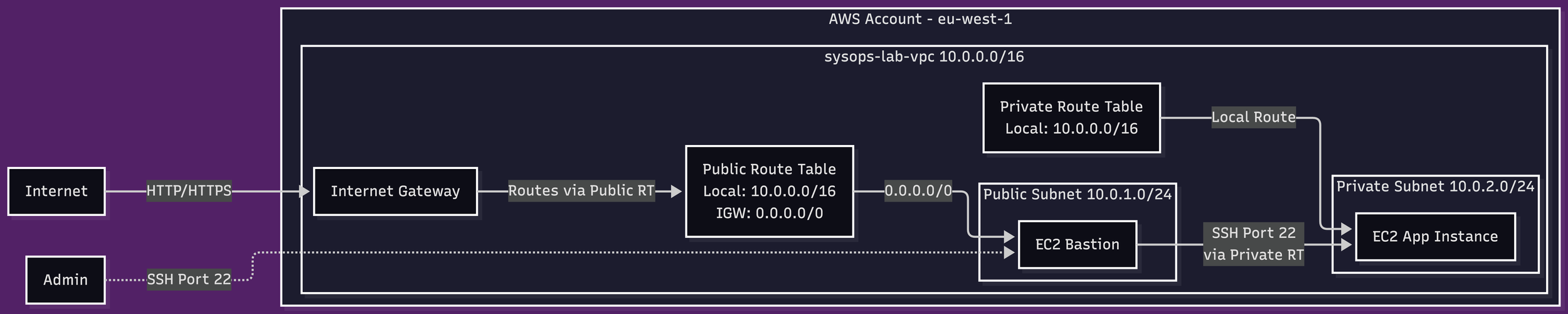
AWS VPC networking lab architectural diagram
Design decisions
Subnet segmentation
Public: 10.0.1.0/24
Private: 10.0.2.0/24
Each subnet was allocated it’s own security group with different routing rules defined in the routing table. Security Groups provided the mechanism for trust boundaries to be defined. The Public subnet allowed outbound traffic via the Internet Gateway. The Private subnet had no internet route defined.
Even if a resource within the private subnet was misconfigured, the instance would not be exposed to the internet. To connect to the internet, instances require a public IP address and permissive sercurity rules.
Route Tables
Public: includes 0.0.0.0/0 → Internet Gateway
Private: 10.0.0.0/16 → local
Access Model (Bastion Host)
Exposing multiple instances to the internet is unnecessary for this lab. I created a single bastion host that was used as a controlled entry point. To enable the Host to have an outbound connection to the internet, I created an Internet Gateway and attached it to the VPC via AWS Console.
Benefits:
Centralised access control
Reduced attack surface
Trade-off:
Manual access dependency
Poor scalability
The Bastion host was created in the public subnet with inbound permissions to enable SSH via Port 22 originating from my IP address. A key pair was also assigned so that all access to the host must be authorised.
Security Model
Bastion Security Group:
- Inbound: SSH (22) from local IP
- Outbound: All traffic
App Security Group:
- Inbound: SSH (22) from bastion SG only
- Outbound: All traffic
Connectivity Validation
Connectivity was validated using a chained approach as described previously: Laptop → Bastion → Private EC2. Bastion reachable via internet, private instance only via routing within the VPC.
Issues and Fixes
Issue: I could not SSH into private instance from bastion due to missing key access. This was due to the fact that when the bastion host was launched, it was assigned a new EBS volume. This volume did not have the access key, as it was held locally on my machine.
To remediate this issue, i used SSH agent forwarding which allowed the SSH credentials used to access the Bastion host to be forwarded to gain access the EC2 App Instance.
Local > Bastion Host
ssh-add sysops-key-1.pem
ssh -A -i sysops-key-1.pem ec2-user@<bastion-public-ip>
Bastion Host > EC2 App
ssh ec2-user@10.0.2.xx
This is a preferable configuration as it ensured that only one instance of the private key remained, and that key remained locally on my private machine. If the bastion were to be compromised, there would be no sensitive material available on the machine that can be exploited.
Lab Complete
